Integration Testing JWT-Protected APIs with .NET Aspire

Most tutorials on JWT authentication stop at "add AddJwtBearer() and configure the options." But the moment you have multiple services behind bearer tokens and a test project that needs to call them all, the configuration plumbing gets painful: every service needs the same signing key, the same issuer, the same audience, and the test project needs to mint tokens and discover service endpoints. In this article we'll look at a .NET Aspire playground that solves all of this with a single shared development JWT authority — and takes it a step further by running the test project inside the Aspire orchestrator so every test appears as a traced span in the dashboard.
Source code: The full playground is available at github.com/enijburg/aspire/tree/main/playground/JwtAuth.
The Problem
Consider a typical microservices scenario: two APIs (api-one and api-two) behind JWT bearer authentication, and an integration test project that exercises both. Without orchestration, you face several headaches:
- Key distribution — every service and the test project must share the same HMAC signing key. Copy-pasting keys across
appsettings.jsonfiles is fragile. - Endpoint discovery — the test project needs to know where the APIs are running (ports, HTTPS, etc.).
- Startup ordering — tests must wait for both APIs to be healthy before firing requests.
- Observability — test results live in the console; correlating a failing test with the API's distributed traces requires manual detective work.
Aspire solves all four.
Architecture
graph LR
    subgraph JwtAuth.AppHost
        devjwt["dev-jwt<br/>(authority)"]
        apiOne["api-one<br/>(ApiOne)"]
        apiTwo["api-two<br/>(ApiTwo)"]
        tests["tests<br/>(Tests)"]

        devjwt -- env vars --> apiOne
        devjwt -- env vars --> apiTwo
        devjwt -- env vars --> tests

        tests -. WithReference .-> apiOne
        tests -. WithReference .-> apiTwo
    end
A single DevJwtAuthorityResource generates and stores the signing key. All services and the test project receive the key, issuer, and audience via environment variables. The test project additionally receives service discovery endpoints for both APIs.
The Shared Development JWT Authority
The Aspire.Hosting.DevJwt library provides a handful of extension methods that wire everything up. Let's walk through the AppHost:
using Aspire.Hosting.DevJwt;

var builder = DistributedApplication.CreateBuilder(args);

var devJwt = builder.AddSharedDevJwtAuthority();

var apiOne = builder.AddJwtProject<Projects.JwtAuth_ApiOne>("api-one", devJwt);
var apiTwo = builder.AddJwtProject<Projects.JwtAuth_ApiTwo>("api-two", devJwt);

builder.AddProject<Projects.JwtAuth_Tests>("tests")
    .WithCurrentDevJwtToken(devJwt)
    .WithNewDevJwtToken(devJwt, name: "test-user", subject: "test-user", roles: ["admin", "reader"])
    .WithNewDevJwtToken(devJwt, name: "readonly", subject: "test-reader", roles: ["reader"])
    .WithNewDevJwtToken(devJwt, name: "noscopes", subject: "test-bare")
    .WithReference(apiOne)
    .WithReference(apiTwo)
    .WaitFor(apiOne)
    .WaitFor(apiTwo)
    .WithArgs("--settings", "test.runsettings")
    .WithExplicitStart();

await builder.Build().RunAsync();
Five things happen here that eliminate all the manual plumbing.
1. Key Generation and Storage
AddSharedDevJwtAuthority() checks the AppHost's user-secrets for a signing key under DevJwt:SigningKey. If none exists, a 256-bit HMAC-SHA256 key is generated and persisted automatically. This means the key survives across dotnet run invocations without ever being committed to source control.
2. Environment Variable Injection
AddJwtProject is a convenience wrapper around AddProject + WithSharedDevJwt. The WithSharedDevJwt method injects four environment variables into each service:
| Variable | Example Value |
|---|---|
Authentication__Schemes__Bearer__ValidIssuer |
https://dev-jwt.local |
Authentication__Schemes__Bearer__ValidAudiences__0 |
microservices-dev |
Authentication__Schemes__Bearer__SigningKeys__0__Issuer |
https://dev-jwt.local |
Authentication__Schemes__Bearer__SigningKeys__0__Value |
(base64 key) |
These map directly to ASP.NET Core's JwtBearerOptions configuration binding. This is the critical insight: ASP.NET Core's authentication system auto-binds from Authentication:Schemes:Bearer:* configuration keys, and environment variables with double-underscore separators map to the colon-delimited hierarchy. So the APIs need zero authentication configuration code beyond the registration call:
builder.Services.AddAuthentication().AddJwtBearer();
No issuer, no audience, no signing key in code — it's all injected by the orchestrator.
3. Pre-Minted Tokens via WithNewDevJwtToken
Rather than injecting the raw signing key into the test project and having it mint tokens itself, WithNewDevJwtToken mints a signed JWT at orchestration time and injects it as a named environment variable (DevJwt__BearerToken__{name}):
| Call | Environment variable |
|---|---|
.WithNewDevJwtToken(devJwt, name: "test-user", ...) |
DevJwt__BearerToken__test-user |
.WithNewDevJwtToken(devJwt, name: "readonly", ...) |
DevJwt__BearerToken__readonly |
.WithNewDevJwtToken(devJwt, name: "noscopes", ...) |
DevJwt__BearerToken__noscopes |
.WithCurrentDevJwtToken(devJwt) |
DevJwt__BearerToken |
This keeps the signing key inside the AppHost and gives the test project ready-to-use tokens — one per test scenario.
4. Dashboard Token Pass-Through via WithCurrentDevJwtToken
Notice the WithCurrentDevJwtToken call in the AppHost. While WithNewDevJwtToken mints tokens from inline claims at orchestration time, WithCurrentDevJwtToken reads the most recently generated JWT from user-secrets (DevJwt:Tokens:Current) and injects it as the default DevJwt__BearerToken environment variable. This means a token created interactively via the dashboard's "Generate JWT" command (see below) is automatically available to the test project the next time it starts.
There's also WithDevJwtProfileToken(devJwt, profile, ...), which reads a saved profile's claims from user-secrets and mints a fresh token at orchestration time — useful when you want a long-lived profile definition but always-fresh tokens.
5. Service Discovery and Health Checks
The test project also gets two things the APIs don't need:
WithReference(apiOne)/WithReference(apiTwo)— injects service discovery endpoints so the test project can resolvehttps+http://api-oneandhttps+http://api-twovia Aspire's built-in service discovery.WaitFor(apiOne)/WaitFor(apiTwo)— ensures both APIs report healthy before the test project starts.
Token Usage in Tests
With the bearer tokens available as environment variables, the test project reads the primary token at class initialization:
[ClassInitialize]
public static async Task ClassInitialize(TestContext context)
{
    // Read the pre-minted bearer token injected by the AppHost via WithNewDevJwtToken.
    _token = Environment.GetEnvironmentVariable(
        SharedDevJwtEnvironmentNames.GetBearerTokenName("test-user"))
        ?? throw new InvalidOperationException(
            "Bearer token not found. Ensure the test is run via the JwtAuth AppHost.");

    // ...
}
Other named tokens for different scenarios are available via the same helper:
var readonlyToken = Environment.GetEnvironmentVariable(
    SharedDevJwtEnvironmentNames.GetBearerTokenName("readonly"));
Because the tokens are minted by the AppHost using the same key, issuer, and audience that the APIs were configured with, they are accepted without any additional setup. The test project never touches the signing key directly — though it could still access it via WithSharedDevJwt if a test needed to mint a custom token at runtime.
Bootstrapping a Lightweight Host for Service Discovery
Here's where it gets interesting. The test project doesn't just fire raw HttpClient requests at hardcoded URLs. Instead, it builds a lightweight IHost that reuses the same Aspire service defaults the APIs use:
var hostBuilder = Host.CreateApplicationBuilder();
hostBuilder.AddServiceDefaults();

hostBuilder.Services.AddOpenTelemetry()
    .WithTracing(tracing => tracing.AddSource(
        TracedTestMethodAttribute.TestActivitySource.Name));

hostBuilder.Services.ConfigureHttpClientDefaults(http =>
{
    http.ConfigurePrimaryHttpMessageHandler(() => new HttpClientHandler
    {
        ServerCertificateCustomValidationCallback =
            HttpClientHandler.DangerousAcceptAnyServerCertificateValidator
    });
});

hostBuilder.Services.AddHttpClient("api-one", client =>
    client.BaseAddress = new Uri("https+http://api-one"));
hostBuilder.Services.AddHttpClient("api-two", client =>
    client.BaseAddress = new Uri("https+http://api-two"));

_host = hostBuilder.Build();
await _host.StartAsync();
Several things are happening:
AddServiceDefaults()— brings in OpenTelemetry (tracing, metrics, OTLP export), service discovery, and resilience. The same extension every Aspire project uses.- Named
HttpClientregistrations —"api-one"and"api-two"withhttps+http://scheme URIs. Aspire's service discovery resolves these to the actual endpoint URLs from the injected environment variables. - OpenTelemetry tracing — the custom
JwtAuth.Testsactivity source is registered so test spans flow to the Aspire dashboard alongside API spans.
The test methods then create clients through IHttpClientFactory:
private static HttpClient CreateAuthenticatedClient(string serviceName)
{
    var client = CreateUnauthenticatedClient(serviceName);
    client.DefaultRequestHeaders.Authorization =
        new AuthenticationHeaderValue("Bearer", _token);
    return client;
}

private static HttpClient CreateUnauthenticatedClient(string serviceName)
{
    var factory = _host.Services
        .GetRequiredService<IHttpClientFactory>();
    return factory.CreateClient(serviceName);
}
This gives us resilient, service-discovery-aware HTTP clients with a single bearer token attached — all resolved from the orchestrator's environment variables.
Tracing Test Execution with OpenTelemetry
The most distinctive part of this setup is TracedTestMethodAttribute. Instead of the standard [TestMethod], every test uses [TracedTestMethod]:
[TracedTestMethod]
public async Task ApiOne_GetWeatherForecast_ReturnsForecasts()
{
    using var client = CreateAuthenticatedClient("api-one");
    var response = await client.GetAsync("/weatherforecast");
    Assert.AreEqual(HttpStatusCode.OK, response.StatusCode);

    TestActivityScope.ReportStatusCode(response.StatusCode);
}
This attribute wraps every test execution in an OpenTelemetry Activity, so each test appears as a span in the Aspire dashboard's distributed traces view — right alongside the API spans it triggered.
How TracedTestMethodAttribute Works
The attribute extends TestMethodAttribute and overrides ExecuteAsync:
[AttributeUsage(AttributeTargets.Method, AllowMultiple = false)]
public sealed class TracedTestMethodAttribute(
    HttpStatusCode expectedStatusCode = HttpStatusCode.OK,
    [CallerFilePath] string callerFilePath = "",
    [CallerLineNumber] int callerLineNumber = -1)
    : TestMethodAttribute(callerFilePath, callerLineNumber)
{
    internal static readonly ActivitySource TestActivitySource = new("JwtAuth.Tests");

    public override async Task<TestResult[]> ExecuteAsync(ITestMethod testMethod)
    {
        using var activity = TestActivitySource.StartActivity(
            testMethod.TestMethodName, ActivityKind.Internal);
        activity?.SetTag("test.name", testMethod.TestMethodName);
        activity?.SetTag("test.expected_status_code", (int)ExpectedStatusCode);
        activity?.SetTag("test.expects_success", (int)ExpectedStatusCode < 400);

        var scope = TestActivityScope.Begin();
        try
        {
            var results = await base.ExecuteAsync(testMethod);

            if (scope.ActualStatusCode.HasValue)
            {
                var passed = (int)scope.ActualStatusCode.Value
                          == (int)ExpectedStatusCode;
                activity?.SetTag("test.actual_status_code",
                    (int)scope.ActualStatusCode.Value);
                activity?.SetTag("test.passed", passed);
                activity?.SetStatus(
                    passed ? ActivityStatusCode.Ok : ActivityStatusCode.Error,
                    passed ? "Test passed"
                           : $"Expected {(int)ExpectedStatusCode} " +
                             $"but got {(int)scope.ActualStatusCode.Value}");
            }
            else
            {
                var passed = results.All(
                    r => r.Outcome == UnitTestOutcome.Passed);
                activity?.SetTag("test.passed", passed);
                activity?.SetStatus(
                    passed ? ActivityStatusCode.Ok : ActivityStatusCode.Error,
                    passed ? "Test passed" : "Test failed");
            }

            return results;
        }
        finally
        {
            TestActivityScope.End();
        }
    }
}
The lifecycle is:
- Start an
Activityon the sharedJwtAuth.Testsactivity source, tagged with the test name and expected status code. - Open a
TestActivityScope— an ambient scope backed byAsyncLocal<T>. - Delegate to
base.ExecuteAsync— the normal MSTest pipeline runs the test body. - Inside the test body,
TestActivityScope.ReportStatusCode(response.StatusCode)stores the observed HTTP status code in theAsyncLocalstate. - After the test completes, compare the reported status code against
ExpectedStatusCodeand set the activity's status and tags accordingly. - Dispose the
Activity(ending the span) and clear theAsyncLocal.
The TestActivityScope Pattern
The challenge is: how does a test method communicate the observed status code back to the wrapping attribute without a direct reference? The answer is AsyncLocal<T>:
public static class TestActivityScope
{
    private static readonly AsyncLocal<ActivityState?> _currentState = new();

    public static void ReportStatusCode(HttpStatusCode statusCode)
    {
        if (_currentState.Value is { } state)
        {
            state.ActualStatusCode = statusCode;
        }
    }

    internal static ActivityState Begin()
    {
        var state = new ActivityState();
        _currentState.Value = state;
        return state;
    }

    internal static void End() => _currentState.Value = null;

    internal sealed class ActivityState
    {
        public HttpStatusCode? ActualStatusCode { get; set; }
    }
}
The attribute calls Begin() before the test and End() after. The test body calls ReportStatusCode() at any point, and the value flows back through the AsyncLocal — safe across async boundaries without any coupling between the test class and the attribute.
Negative Tests with Expected Status Codes
The attribute accepts an optional expectedStatusCode parameter, which defaults to HttpStatusCode.OK. For negative tests — like verifying that unauthenticated requests return 401 — you pass the expected status code directly:
[TracedTestMethod(HttpStatusCode.Unauthorized)]
public async Task ApiOne_WithoutToken_ReturnsUnauthorized()
{
    using var client = CreateUnauthenticatedClient("api-one");
    var response = await client.GetAsync("/weatherforecast");
    Assert.AreEqual(HttpStatusCode.Unauthorized, response.StatusCode);

    TestActivityScope.ReportStatusCode(response.StatusCode);
}
In the Aspire dashboard, this span will show test.expected_status_code = 401, test.actual_status_code = 401, and test.passed = true — making it immediately clear that the 401 was intentional, not a failure.
WithExplicitStart and the MSTest Runner
One subtle but important detail in the AppHost configuration:
builder.AddProject<Projects.JwtAuth_Tests>("tests")
    // ...
    .WithArgs("--settings", "test.runsettings")
    .WithExplicitStart();
WithExplicitStart() means the test project does not auto-start when the AppHost launches. You start it manually from the Aspire dashboard when you're ready to run the tests. This prevents the tests from firing before you've had a chance to inspect the services or set breakpoints.
WithArgs("--settings", "test.runsettings") passes a runsettings file to the MSTest runner. The file disables CaptureTraceOutput:
<?xml version="1.0" encoding="utf-8"?>
<RunSettings>
  <MSTest>
    <CaptureTraceOutput>false</CaptureTraceOutput>
  </MSTest>
</RunSettings>
By default, MSTest captures Console.Out and Console.Error into per-test buffers. This is useful in Visual Studio's Test Explorer but means diagnostic output never reaches stdout — and therefore never appears in the Aspire dashboard's console logs. Disabling capture ensures that log output from the test host flows to the dashboard.
The test project's .csproj sets EnableMSTestRunner to true:
<EnableMSTestRunner>true</EnableMSTestRunner>
This tells MSTest to compile the project as an executable that runs tests when launched — exactly what Aspire needs to orchestrate it as a project resource.
Activity Tags at a Glance
Every test span produced by TracedTestMethodAttribute carries these tags:
| Tag | Type | Description |
|---|---|---|
test.name |
string | The test method name |
test.expected_status_code |
int | The HTTP status code the test expects |
test.expects_success |
bool | true when expected status code < 400 |
test.actual_status_code |
int | The HTTP status code reported by TestActivityScope |
test.passed |
bool | Whether actual matched expected |
When you open the Aspire dashboard's traces view, you see the full picture: the test span as a parent, the HTTP client span as a child, and the API's request handling span nested within — all connected by the W3C trace context that flows through the HttpClient automatically.
The Generate JWT Command and Named Profiles
Beyond the programmatic token injection described above, the dev-jwt resource exposes a Generate JWT command directly in the Aspire dashboard. Click the command button on the dev-jwt resource and you'll see a two-step interactive dialog:
- Profile picker — if any saved profiles exist in user-secrets, a dropdown lists them alongside a "(Create new)" option. If no profiles exist yet, this step is skipped automatically.
- JWT generation form — fields for Profile Name, Subject, Expiry (dropdown with presets from 15 minutes to 1 year), Roles, Scopes, and Custom Claims JSON. When editing an existing profile, all fields are pre-populated from the saved values.

After generation, three things happen:
- The token is persisted in user-secrets under
DevJwt:Tokens:Current— this is the value thatWithCurrentDevJwtTokenreads. - The profile's claims are saved under
DevJwt:Profiles:{name}:*(Subject, Expiry, Roles, Scopes, CustomClaimsJson) — these survive across AppHost restarts. - The
dev-jwtresource's BearerToken environment variable is updated live in the dashboard, so you can copy it immediately.
The resource details panel in the dashboard displays the authority's Issuer, Audience, SigningKey, and BearerToken as environment variables with the built-in show/hide masking toggle — no need to dig through user-secrets to find the current token.
Putting It All Together
The end-to-end flow:
Start the AppHost — the
dev-jwtresource generates (or loads) the signing key. Both APIs start with the injected JWT configuration. The dashboard shows thedev-jwtresource as "Ready" with its Issuer, Audience, and SigningKey visible in the environment variables panel.Open the Aspire dashboard — you see
api-one,api-two, andtests(stopped) in the resources view.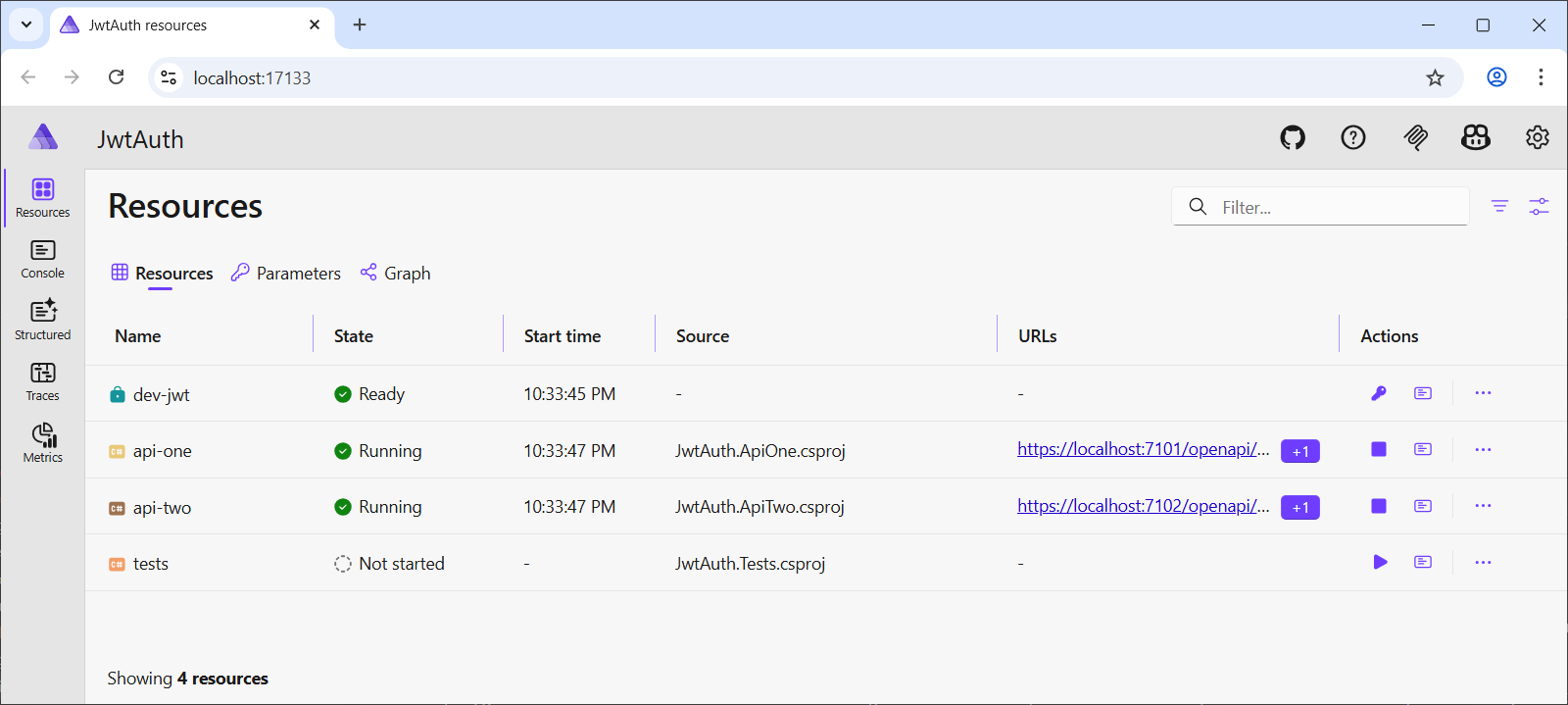
Generate a token (optional) — click the "Generate JWT" command on the
dev-jwtresource. Pick an existing profile or create a new one, fill in the claims, and generate. The token appears immediately in the resource's environment variables.Start the tests — click the start button on the
testsresource. It waits for both APIs to be healthy, reads the pre-minted JWTs from the environment (including the dashboard-generated token viaWithCurrentDevJwtToken), builds a lightweight host with service discovery, and runs the test suite.Inspect traces — each test appears as a span in the traces view. Successful tests show green; failures show red with a message like "Expected 200 but got 401". Click a span to see the full trace including the API's request processing.
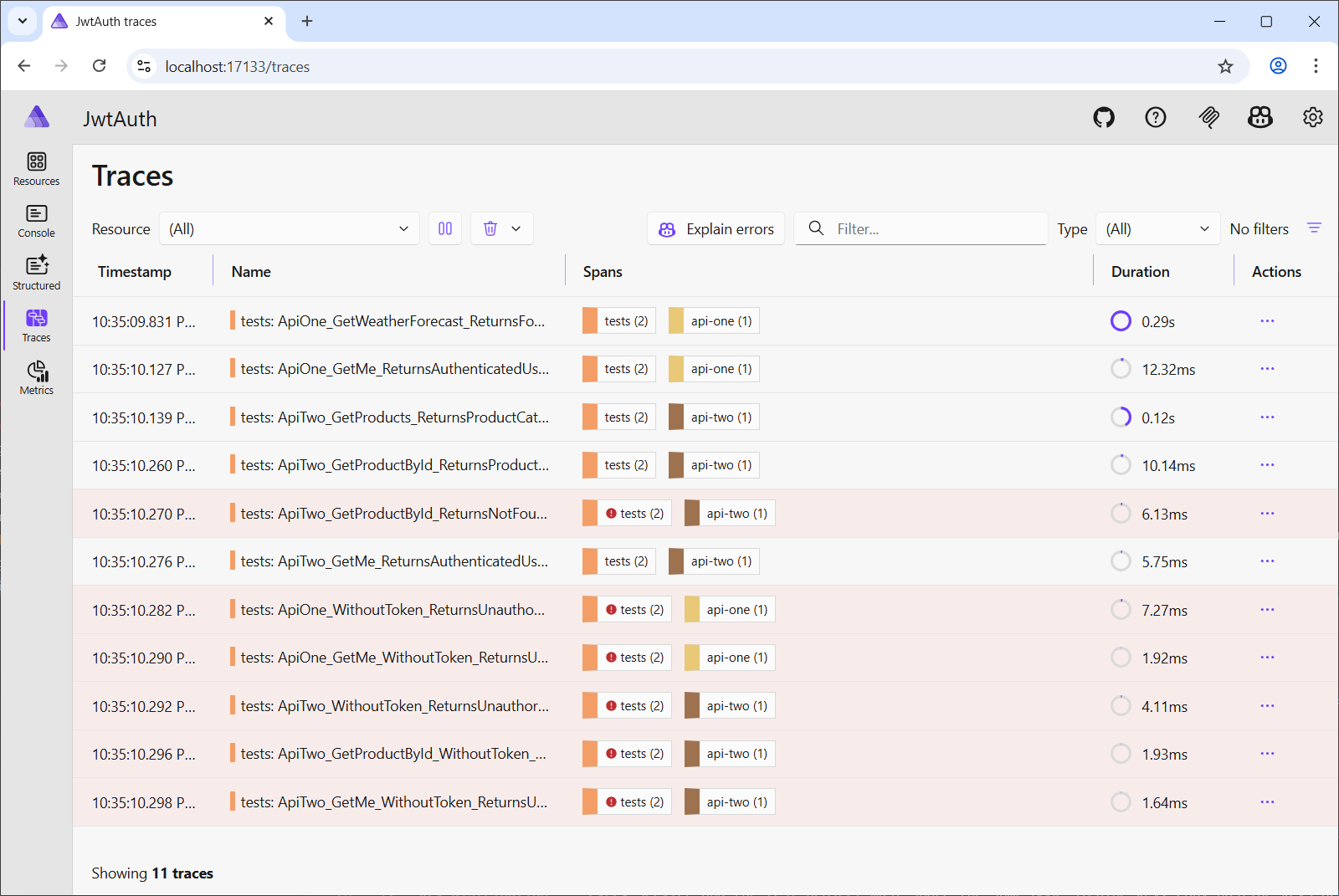
Inspect console logs — because
CaptureTraceOutputis disabled, the structured log output from the test host (including the pretty-printed response bodies) appears in the dashboard's console view.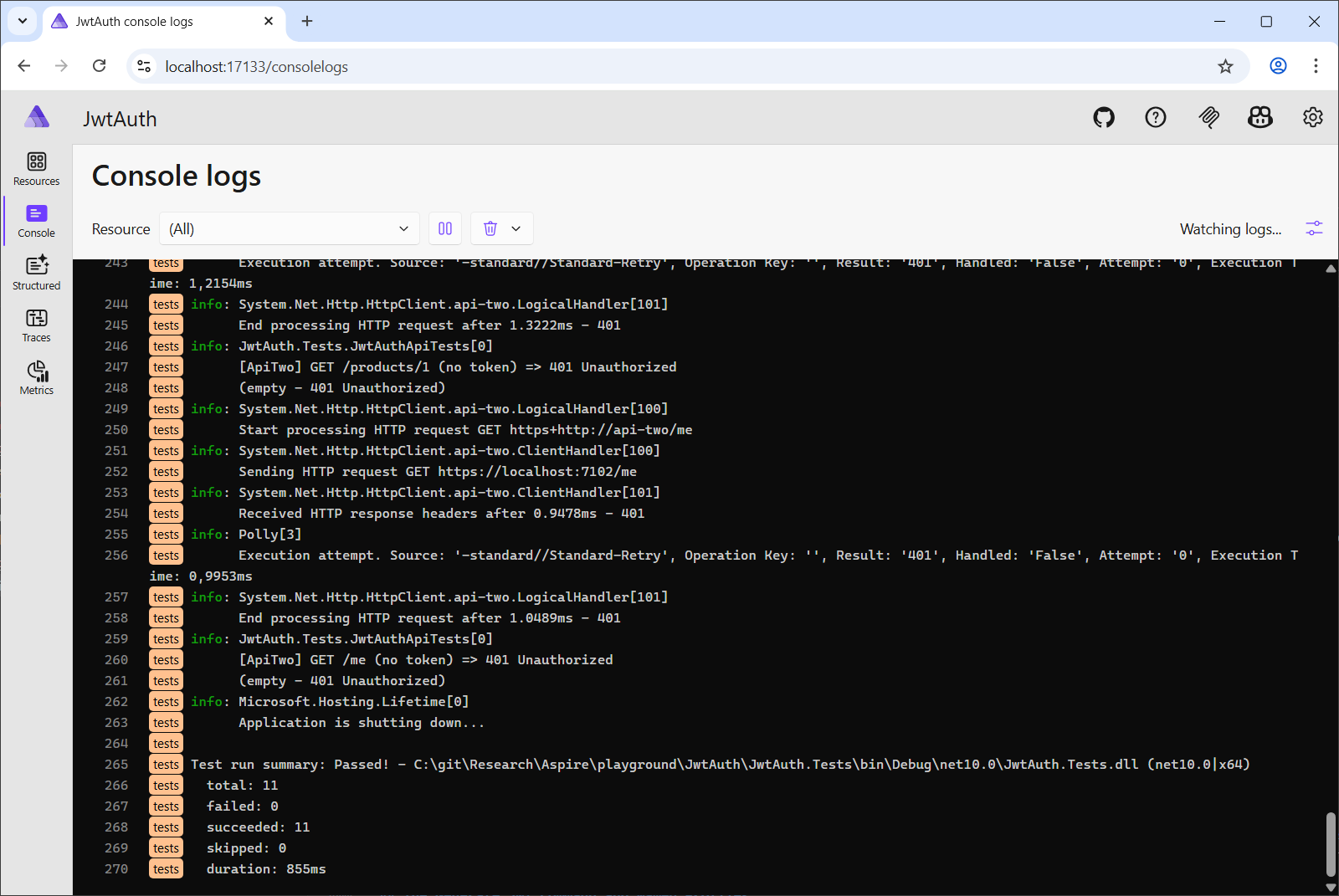


Key Takeaways
AddSharedDevJwtAuthority()generates and stores an HMAC signing key in user-secrets, then distributes it to all services via environment variables. APIs need zero authentication configuration code. The authority's details (Issuer, Audience, SigningKey, BearerToken) are visible in the dashboard's environment variables panel.WithNewDevJwtToken()mints JWTs at orchestration time and injects them as environment variables. Named tokens (DevJwt__BearerToken__{name}) let the test project carry multiple tokens for different test scenarios without ever touching the signing key.WithCurrentDevJwtToken()reads the most recently dashboard-generated JWT from user-secrets and injects it as the defaultDevJwt__BearerTokenenvironment variable — bridging interactive token generation with automated test execution.WithDevJwtProfileToken()reads a saved profile's claims from user-secrets and mints a fresh token at orchestration time — useful for stable profile definitions with always-fresh tokens.- Named profiles in the dashboard's "Generate JWT" command let you save and reuse token configurations across AppHost restarts. Profiles are persisted in user-secrets under
DevJwt:Profiles:{name}:*. - The test project runs inside the Aspire orchestrator as a project resource with
EnableMSTestRunner, giving it access to service discovery, environment variables, and health-check-based startup ordering. TracedTestMethodAttributewraps each test in an OpenTelemetryActivity, making test execution visible in the Aspire dashboard's traces view alongside the API spans.TestActivityScopeusesAsyncLocal<T>to communicate the observed HTTP status code from the test body back to the wrapping attribute — a clean pattern for ambient state in async test pipelines.WithExplicitStart()keeps the test project from auto-launching, and a customtest.runsettingsensures console output reaches the dashboard.