Automated RBAC on Azure SQL — Using Azure Policy to Eliminate Manual Access Management

In most teams I’ve worked with, the real problem isn’t provisioning an Azure SQL database — it’s access. Getting RBAC and Entra-based permissions set up correctly is where things break down. Admins are understandably reluctant to grant the required rights broadly, and standard pipelines typically cannot assign SQL role memberships automatically.
When that friction isn’t resolved, teams tend to fall back to what does work: connection strings with embedded secrets. It’s faster, but it bypasses proper identity and access controls entirely.

Some organizations try to solve this by centralizing database provisioning through admin-managed IaC pipelines. In practice, this just shifts the bottleneck: additional steps, tickets, and delays, without actually solving the underlying access problem.
This all started when someone told me it couldn’t be fixed — that this gap between RBAC and SQL permissions was just something you had to accept.
I didn’t agree. Challenge accepted.
I wanted to fix this properly. Not with a runbook. Not with a Teams reminder. With something that works automatically, securely, and every single time.
So I built a solution that uses Azure Policy to detect new databases and automatically assign AAD groups to SQL roles — with zero stored credentials and no human intervention.
Architecture
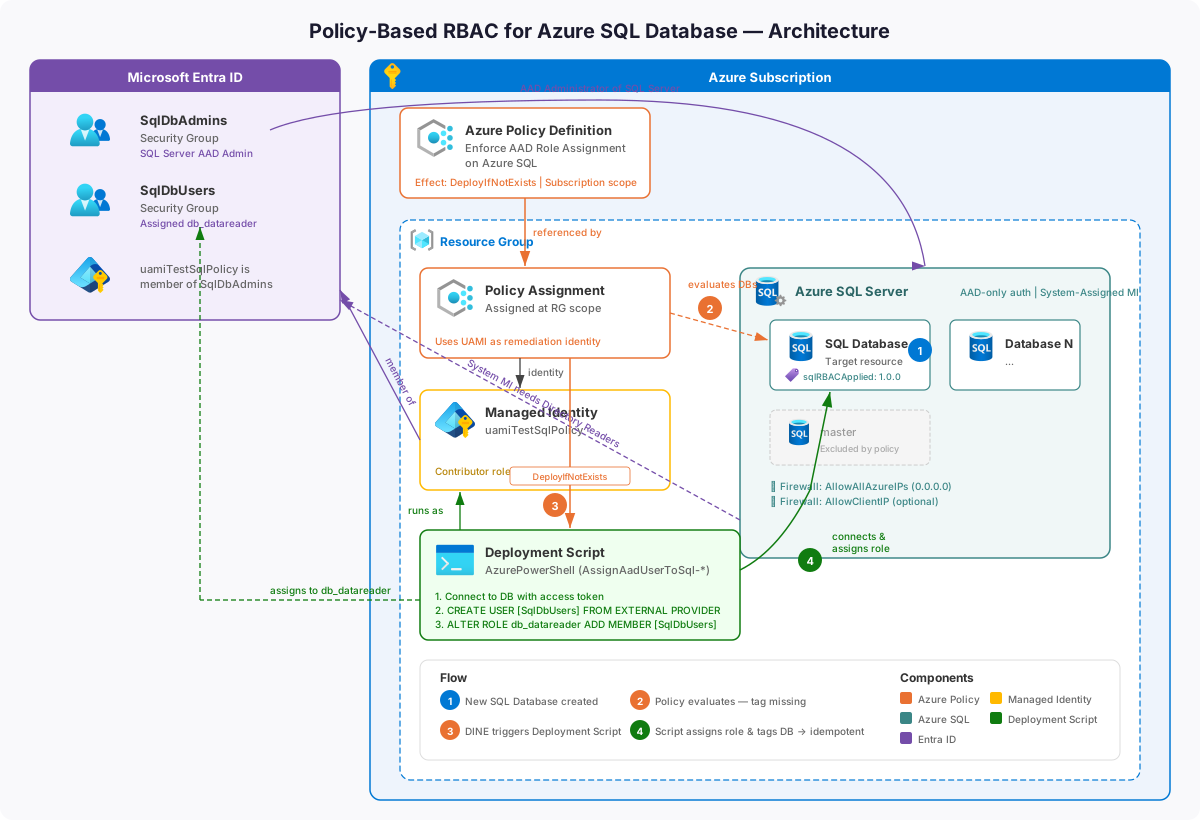
Source code: The full solution is available at github.com/enijburg/PolicyBasedRbacForSqlServer.
The Azure SQL Access Problem
In a traditional setup, creating a new Azure SQL database means someone has to:
- Connect with admin credentials
- Create the correct AAD user or group inside the database
- Assign that user/group to the appropriate SQL role (e.g.,
db_datareader)
This is manual, error-prone, and doesn't scale. Worse — it creates a window where a database is only accessible to the server admin. That's a security gap.
The goal: every new Azure SQL database (except master) should automatically get the correct AAD group assigned to db_datareader, with no human intervention.
How It Works
The solution combines three Azure-native capabilities:
- Azure Policy (
DeployIfNotExists) — detects new or non-compliant databases and triggers remediation - Azure Deployment Script — runs PowerShell remediation inside Azure as a Managed Identity
- User-Assigned Managed Identity — provides secure, credential-free auth to SQL and Azure APIs
A tag (sqlRBACApplied: 1.0.0) marks each database once RBAC is configured. The policy won't trigger again unless the tag is removed or changed. This makes the whole thing idempotent.
Here's the high-level architecture showing how all the components relate:
graph TD
    subgraph AAD["Azure Active Directory"]
        AdminGroup["SqlDbAdmins<br>(AAD Security Group)"]
        UserGroup["SqlDbUsers<br>(AAD Security Group)"]
        MI["uamiTestSqlPolicy<br>(User-Assigned Managed Identity)"]
        MI -->|member of| AdminGroup
    end

    subgraph Azure["Azure Subscription / Resource Group"]
        Policy["Azure Policy Definition<br>EnforceAadRoleAssignment<br>OnAzureSql<br>(DeployIfNotExists)"]
        Assignment["Policy Assignment<br>(scoped to resource group)"]
        Script["Deployment Script<br>AssignAadUserToSql-{dbName}<br>(AzurePowerShell 12.1)"]
        MI -->|runs| Script

        subgraph SQL["Azure SQL"]
            Server["SQL Server<br>(AAD Admin: SqlDbAdmins)"]
            DB1["Database: TestDb1<br>tag: sqlRBACApplied=1.0.0"]
            DB2["Database: TestDb2<br>tag: sqlRBACApplied=1.0.0"]
            Server --> DB1
            Server --> DB2
        end
    end

    Assignment -->|enforces| Policy
    Policy -->|triggers on new DB| Script
    Script -->|creates user + assigns role| DB1
    Script -->|creates user + assigns role| DB2
    UserGroup -->|db_datareader role member| DB1
    UserGroup -->|db_datareader role member| DB2
    AdminGroup -->|SQL Server AD Admin| Server

    style AAD fill:#dde8f7,stroke:#4a90d9
    style Azure fill:#f0f4f0,stroke:#5a9e5a
    style SQL fill:#fff3e0,stroke:#e09a00
From a business perspective, the flow is straightforward:
- A developer or pipeline creates a new Azure SQL database
- Azure Policy detects it and checks for the
sqlRBACAppliedtag - If missing, the policy deploys a short-lived remediation script
- The script connects to the database, creates the AAD group as a user, assigns it to
db_datareader - The script tags the database to record completion
- The deployment script auto-deletes after one day
The AAD group SqlDbUsers now has read access to every new database — no DBA intervention required.
The Full Sequence
Here's what happens step by step when a developer creates a new database:
sequenceDiagram
    actor Developer
    participant AzureSQL as Azure SQL Service
    participant Policy as Azure Policy Engine
    participant ARM as Azure Resource Manager
    participant Script as Deployment Script<br/>(AzurePowerShell)
    participant MI as uamiTestSqlPolicy<br/>(Managed Identity)
    participant AAD as Azure Active Directory
    participant DB as SQL Database

    Developer->>AzureSQL: Create new database (e.g. TestDb2)
    AzureSQL->>ARM: Register resource<br/>Microsoft.Sql/servers/databases
    ARM->>Policy: Trigger policy evaluation

    Policy->>Policy: Check conditions:<br/>type == Sql/databases?<br/>name != master?<br/>tag sqlRBACApplied != 1.0.0?

    alt All conditions met (non-compliant)
        Policy->>ARM: Deploy remediation template
        ARM->>Script: Create DeploymentScript resource<br/>AssignAadUserToSql-TestDb2
        Script->>MI: Run as uamiTestSqlPolicy
        MI->>AAD: Request access token<br/>for https://database.windows.net
        AAD-->>MI: Return Bearer token
        MI->>DB: Open SQL connection<br/>(token-based, no password)
        MI->>DB: IF NOT EXISTS CREATE USER [SqlDbUsers]<br/>FROM EXTERNAL PROVIDER
        MI->>DB: ALTER ROLE db_datareader<br/>ADD MEMBER [SqlDbUsers]
        MI->>DB: Close connection
        MI->>ARM: Set tag sqlRBACApplied=1.0.0<br/>on database resource
        ARM-->>Script: Tag applied successfully
        Script-->>ARM: Script completed — auto-delete after 1 day
    else Already compliant (tag present)
        Policy-->>ARM: No action needed
    end
Under the Hood
Let me walk through each component and why it's designed the way it is.
The Policy Definition
The policy is a DeployIfNotExists targeting Microsoft.Sql/servers/databases. Three conditions must all be true before it triggers:
flowchart LR
    A["Resource created or updated"] --> B{"type ==<br>Microsoft.Sql/<br>servers/databases?"}
    B -- No --> Z["No action"]
    B -- Yes --> C{"name !=<br>'master'?"}
    C -- No --> Z
    C -- Yes --> D{"tag sqlRBACApplied<br>!= '1.0.0'?"}
    D -- No --> Z
    D -- Yes --> E["Trigger<br>DeployIfNotExists"]
    E --> F["Deploy remediation<br>ARM template"]
Two parameters drive the policy:
principalNameToAssign— the AAD group or user to assign (e.g.,SqlDbUsers)userAssignedIdentityResourceId— the full resource ID of the Managed Identity that runs the script
The policy's managed identity needs the Contributor role on the resource group to deploy the remediation script.
The Deployment Script
When triggered, the policy deploys a Microsoft.Resources/deploymentScripts resource — Azure's native mechanism for running scripts as part of an ARM deployment.
Key properties:
- Runtime: AzurePowerShell 12.1
- Timeout: 15 minutes (
PT15M) - Cleanup:
OnSuccess— auto-deleted after 1 day - Identity: User-Assigned (
uamiTestSqlPolicy) - Naming:
AssignAadUserToSql-{databaseName}— unique per database
The SQL server name is extracted from the resource ID using an ARM expression:
"value": "[split(field('id'), '/')[8]]"The PowerShell Script (SetPrincipalName.ps1)
This is the core of the solution. It runs inside Azure's managed container environment as the Managed Identity.
flowchart TD
    A([Start]) --> B[Validate input parameters]
    B --> C{All params<br>present?}
    C -- No --> ERR([Throw error])
    C -- Yes --> D["Acquire access token<br>Get-AzAccessToken<br>-ResourceUrl https://database.windows.net"]
    D --> E{Token<br>acquired?}
    E -- No --> ERR
    E -- Yes --> F["Build FQDN<br>{sqlServer}{sqlSuffix}"]
    F --> G["Open SqlConnection<br>ConnectionString + AccessToken<br>(no password)"]
    G --> H["IF NOT EXISTS<br>CREATE USER [principalName]<br>FROM EXTERNAL PROVIDER"]
    H --> I["ALTER ROLE db_datareader<br>ADD MEMBER [principalName]"]
    I --> J[Close SQL connection]
    J --> J2["Open connection to master DB<br>(for Azure Portal Query Editor access)"]
    J2 --> J3["IF NOT EXISTS<br>CREATE USER [principalName]<br>FROM EXTERNAL PROVIDER"]
    J3 --> J4[Close master connection]
    J4 --> K["Get current database tags<br>Get-AzResource"]
    K --> L["Add sqlRBACApplied=1.0.0<br>Set-AzResource -Tag"]
    L --> M([Done ✓])
    G -- Error --> N[Close connection if open]
    N --> ERR
    J2 -- Warning only --> K
The SQL commands are idempotent by design:
-- Only creates user if absent
IF NOT EXISTS (
    SELECT * FROM sys.database_principals WHERE name = N'SqlDbUsers'
)
BEGIN
    CREATE USER [SqlDbUsers] FROM EXTERNAL PROVIDER
END

-- Safe to repeat — silently succeeds if already a member
ALTER ROLE db_datareader ADD MEMBER [SqlDbUsers]
The Managed Identity
The uamiTestSqlPolicy identity is the security backbone. No passwords anywhere.
graph LR
    MI["uamiTestSqlPolicy<br>(Managed Identity)"]

    MI -->|"Contributor role<br>(on resource group)"| RG["Resource Group<br>rg_testsqlpolicy"]
    MI -->|"Member of"| AdminGroup["SqlDbAdmins<br>(AAD Group)"]
    AdminGroup -->|"SQL Server AD Admin"| Server["Azure SQL Server"]
    MI -->|"Runs as"| Script["Deployment Script"]
    Script -->|"Gets token from"| AAD["Azure AD Token Endpoint"]
    Script -->|"Authenticates to"| SQL["Azure SQL Database"]
Why this works without passwords:
- The deployment script runs in an Azure-managed container with the MI context injected
Get-AzAccessToken -ResourceUrl https://database.windows.netsilently acquires a token- The token is set as the
AccessTokenproperty on theSqlConnectionobject - SQL Server validates the token against AAD — no username/password exchange
The AAD Groups
Two security groups coordinate access:
| Group | Purpose | Scope |
|---|---|---|
SqlDbAdmins |
SQL Server-level admin access | SQL Server (not individual DBs) |
SqlDbUsers |
Database-level read access | Every new database (via policy) |
The managed identity is a member of SqlDbAdmins, which is set as the SQL Server's AAD administrator. That gives the deployment script the permissions it needs to run CREATE USER and ALTER ROLE inside any database on the server.
Authentication Flow
Here's the exact sequence of auth calls — notice there's no password anywhere in the chain:
sequenceDiagram
    participant Script as Deployment Script<br/>(running as uamiTestSqlPolicy)
    participant IMDS as Azure Instance Metadata<br/>Service (IMDS)
    participant AAD as Azure Active Directory
    participant SQL as Azure SQL Database

    Script->>IMDS: Get-AzAccessToken<br/>-ResourceUrl https://database.windows.net
    IMDS->>AAD: Exchange MI credentials<br/>for access token
    AAD-->>IMDS: JWT Bearer token<br/>(audience: database.windows.net)
    IMDS-->>Script: Return token string

    Script->>SQL: SqlConnection.Open()<br/>ConnectionString + AccessToken
    SQL->>AAD: Validate token<br/>(verify signature, audience, expiry)
    AAD-->>SQL: Token valid — identity: uamiTestSqlPolicy
    SQL-->>Script: Connection established

    Script->>SQL: CREATE USER / ALTER ROLE
    SQL-->>Script: Commands executed
    Script->>SQL: Connection.Close()
Idempotency — Why You Can Re-run Everything Safely
Idempotency is built into two levels:
graph TD
    subgraph PolicyLevel["Policy Level"]
        P1["Policy evaluates database"] --> P2{"tag sqlRBACApplied<br>== '1.0.0'?"}
        P2 -- Yes --> P3["Compliant — no action"]
        P2 -- No --> P4["Deploy remediation script"]
    end

    subgraph ScriptLevel["Script Level (SQL)"]
        S1["IF NOT EXISTS<br>CREATE USER [SqlDbUsers]"] --> S2["Always safe to run"]
        S3["ALTER ROLE db_datareader<br>ADD MEMBER [SqlDbUsers]"] --> S4["Idempotent in SQL Server"]
    end

    P4 --> S1
    S4 --> T["Set tag: sqlRBACApplied=1.0.0"]
    T --> P3
- Policy level: the
sqlRBACAppliedtag acts as a completion marker. Once set, the policy considers the database compliant. - Script level:
IF NOT EXISTSguardsCREATE USER.ALTER ROLE ... ADD MEMBERis natively idempotent in SQL Server.
This means you can safely re-run the entire flow (e.g., by removing the tag) without risk of errors or duplicates.
Infrastructure-as-Code
The solution is defined in Bicep, organised into composable modules:
infra/
├── main.bicep              # Main orchestration (subscription scope)
├── main.bicepparam         # Parameters file
└── modules/
    ├── managedIdentity.bicep   # UAMI + Contributor role
    ├── policyDefinition.bicep  # Policy definition (embeds SetPrincipalName.ps1)
    ├── policyAssignment.bicep  # Policy assignment (resource group scope)
    └── sqlServer.bicep         # SQL Server with AAD-only auth + databases
One thing I really like: the PowerShell script is loaded at compile time using Bicep's loadTextContent():
scriptContent: loadTextContent('../../SetPrincipalName.ps1')SetPrincipalName.ps1 is the single source of truth. Edit it, redeploy, done. No manual copy/paste.
Deployment
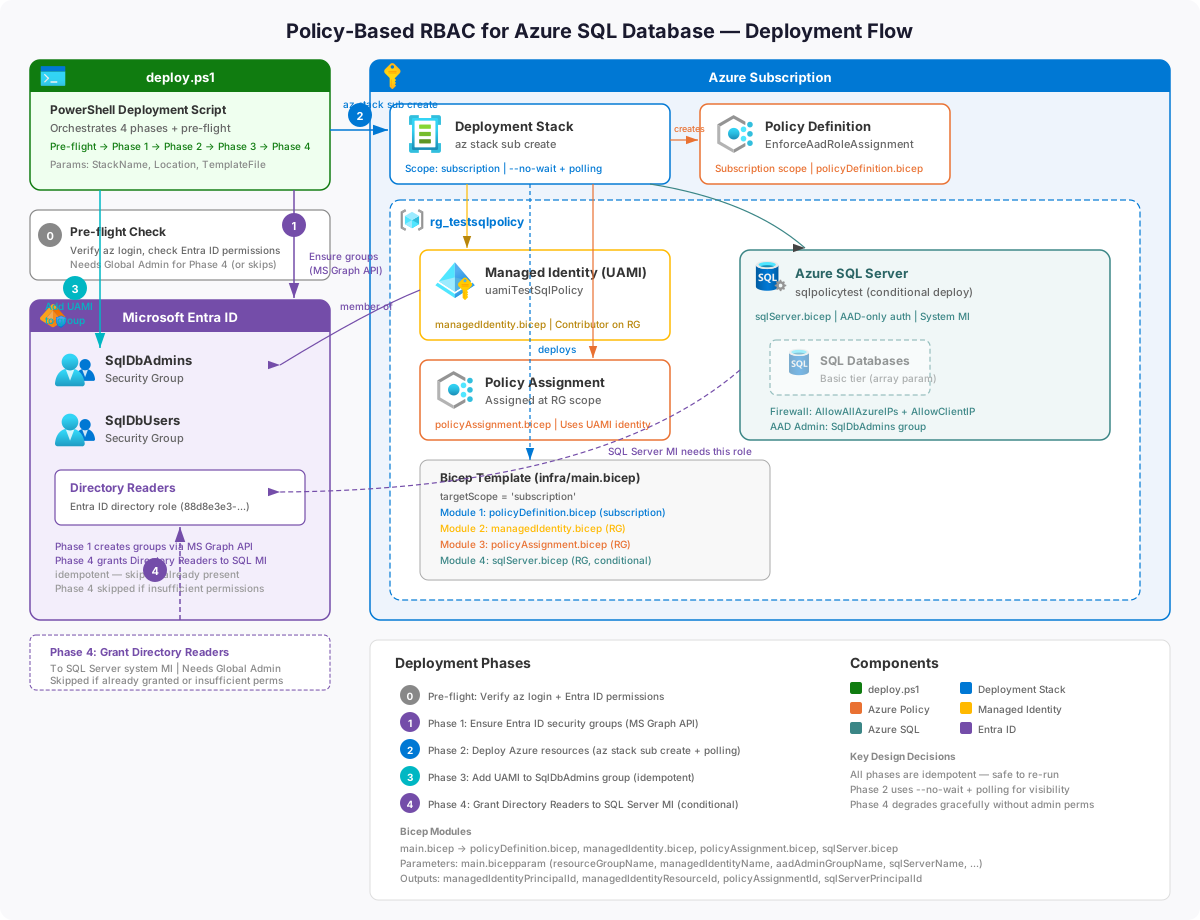
The deploy.ps1 script automates the full setup across four phases:
flowchart TD
    A([Start]) --> B["Ensure Entra ID groups exist<br>SqlDbAdmins, SqlDbUsers<br>(Phase 1 — idempotent)"]
    B --> C["Deploy all Azure resources<br>via az stack sub create<br>(Phase 2)"]
    C --> C1["Managed Identity created<br>Contributor role assigned"]
    C --> C2["Policy Definition deployed<br>at subscription scope"]
    C --> C3["Policy Assignment created<br>at resource group scope"]
    C --> C4["SQL Server created<br>(AAD-only auth)"]
    C --> C5["SQL Databases created<br>(policy auto-triggers for each)"]
    C1 & C2 & C3 & C4 & C5 --> D["Add Managed Identity<br>to SqlDbAdmins group<br>(Phase 3 — idempotent)"]
    D --> E["Grant Directory Readers<br>to SQL Server MI in Entra ID<br>(Phase 4)"]
    E --> F([Done — all DBs<br>have RBAC assigned ✓])
Run it:
# Edit infra/main.bicepparam with your values, then:
./deploy.ps1

# Optional parameters:
./deploy.ps1 -StackName MyStack -Location westeurope
All four phases run automatically. If the signed-in user lacks Privileged Role Administrator or Global Administrator rights, Phase 4 is skipped and a copy-pasteable Cloud Shell snippet is printed for a Global Admin to run separately.
Tearing It Down
The solution is deployed as an Azure deployment stack. Teardown is two steps.
Step 1 — Delete the deployment stack
az stack sub delete `
  --name PolicyBasedRbacDeployStack `
  --action-on-unmanage deleteAll `
  --yes
--action-on-unmanage deleteAll deletes every tracked resource. Use detachAll instead to stop tracking without deleting.
Step 2 — Remove Entra ID objects (manual)
The security groups and Directory Readers role live outside the stack:
Remove Directory Readers from the SQL Server's MI:
$sqlPrincipalId = az sql server show `
  --name <your-sql-server-name> --resource-group <your-resource-group> `
  --query identity.principalId --output tsv

$drRoleId = az rest --method GET `
  --uri "https://graph.microsoft.com/v1.0/directoryRoles?`$filter=roleTemplateId eq '88d8e3e3-8f55-4a1e-953a-9b9898b8876b'" `
  --query "value[0].id" --output tsv

az rest --method DELETE `
  --uri "https://graph.microsoft.com/v1.0/directoryRoles/$drRoleId/members/$sqlPrincipalId/`$ref"
Delete the Entra ID security groups (only if not used elsewhere):
az ad group delete --group SqlDbAdmins
az ad group delete --group SqlDbUsers
Security
| Concern | How It's Addressed |
|---|---|
| No stored credentials | Managed Identity — no passwords in code, policy, or env vars |
| Least privilege | SqlDbUsers gets db_datareader only — read access |
| Admin separation | SqlDbAdmins and SqlDbUsers are separate groups |
| Encrypted connections | Encrypt=True;TrustServerCertificate=False — TLS enforced |
| Script cleanup | Deployment scripts auto-delete after one day |
| AAD-only auth | SQL Server created with --enable-ad-only-auth true |
| Audit trail | sqlRBACApplied tag on each database |
My 50cts
This pattern solves a real, everyday problem: databases get created, and nobody remembers or has rights to set up access.
The combination of Azure Policy for detection, Deployment Scripts for remediation, and Managed Identity for authentication is powerful. It's fully declarative, fully automated, and there are zero credentials to rotate or leak.
What I like most is that it's boring in the best way. Once deployed, it just works. Every new database gets the right access. Every time. No tickets, no runbooks, no "can someone give me access to the new DB?"
The design principles — idempotency, least privilege, no stored secrets — make it a solid foundation for Azure SQL access automation that you can extend: assign other roles, target other resource types, or scale to subscription-wide scope with minimal changes.